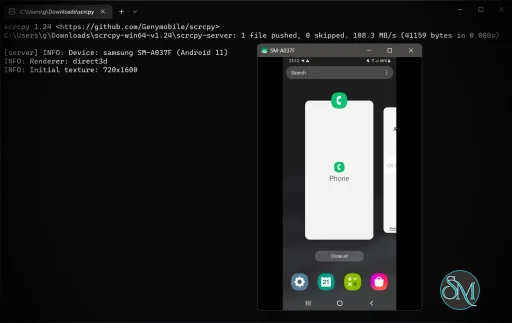
scrcpy is a free and open source application developed by Genymobile for mirroring and controlling Android devices from a desktop computer.
The tool works over USB or wireless connections and supports Windows, Linux, and macOS. Unlike traditional emulators, scrcpy displays and controls the actual Android device in real time without requiring root access.
scrcpy has become one of the most respected Android utilities among developers, testers, and advanced users thanks to its fast performance, low latency, and completely free open source approach. Unlike many commercial mirroring tools, it avoids ads, subscriptions, and unnecessary background services while delivering exceptional responsiveness.
Key Features of scrcpy
Low Latency Screen Mirroring
scrcpy is widely praised for its extremely low latency performance. Input feels responsive enough for typing, navigation, testing, and even light gaming.Keyboard and Mouse Control
Users can control Android devices directly from the computer using standard keyboard and mouse input.No Root Required
The application works without rooting the Android device, making setup safer and easier for most users.USB and Wireless Support
scrcpy supports both wired USB connections and wireless TCP/IP mode for flexible usage.High Resolution Recording
The tool can record Android screens directly to video files with minimal performance impact.Lightweight and Ad Free
Unlike many Android mirroring tools, scrcpy is fully open source with no ads, subscriptions, or bundled software.Advanced Command Line Controls
Power users can customize resolution, bitrate, cropping, audio forwarding, frame rates, recording settings, and more through command line options.
Download scrcpy 5.0 - Software Mirrors |
|---|
Download scrcpy 5.0 Download scrcpy 5.0 Download scrcpy 5.0 Download scrcpy 5.0 |
scrcpy 5.0 Release Notes:_To receive a notification when a new release is available, click on Watch > Custom > Releases at the top._scrcpy v5.0 Changes since v4.1:
HighlightsHardware decodingThe video stream is now decoded in hardware on the computer, when possible. Decoding is faster, CPU usage drops by 10×, and power consumption is lower. Hardware decoding is enabled by default. Use--hwdec to select a specific decoder, or --hwdec=disabled to force software decoding:
--hwdec=auto (or when the option is not passed at all), scrcpy falls back to software decoding if the hardware decoder cannot handle the stream.
On Linux, VA-API requires the GPU's VA-API driver (va-driver-all on Debian/Ubuntu).
See video documentation, #7001 and #7057 for details.
|
User Experience
scrcpy is designed more for functionality than visual polish. The application itself has a minimal interface because most control happens through command line arguments or simple launchers.
For technical users, the workflow is extremely efficient. Developers especially appreciate the speed and reliability during debugging, testing, presentations, and remote device management.
Beginners may initially find the setup process slightly intimidating because it requires enabling USB debugging through Android developer settings.
Performance and Compatibility
Performance is where scrcpy truly stands out.
The application uses Android’s adb system and hardware accelerated encoding, allowing smooth high frame rate mirroring with remarkably low system overhead. Many users report better responsiveness than commercial alternatives.
scrcpy supports Android 5.0 and newer devices, though newer Android versions generally provide better compatibility and features.
Recent versions also introduced audio forwarding support on supported Android devices, which was one of the most requested features for years.
Privacy and Security
Because scrcpy works locally through adb connections and does not rely on cloud services, privacy is significantly stronger than many commercial phone mirroring platforms.
The tool does not require account creation, online synchronization, or third party servers.
However, users should still understand that enabling USB debugging grants elevated device control privileges while connected to trusted computers.
Pros
Completely free and open source
Extremely low latency performance
No ads or subscriptions
Works without root access
USB and wireless support
Lightweight and efficient
Excellent for developers and testing
Cons
Initial setup may confuse beginners
Minimal graphical interface
Some advanced features require command line usage
Wireless mode setup is less seamless than commercial apps
scrcpy is ideal for developers, Android testers, streamers, educators, and advanced users who want fast and reliable Android mirroring without commercial limitations.
It is also excellent for users who prioritize open source software, privacy, and low resource usage.
scrcpy remains one of the best Android utilities available today. Its combination of speed, low latency, open source transparency, and powerful functionality makes it the gold standard for Android screen mirroring and remote control on desktop systems.
Developer:
Genymobile
Operating System:
Windows / macOS / Linux
Date Added:
2026-10-05T20:03:44.360Z
Categories:
Post a Comment/Report Broken Link: