openGym is an open-source, self-hosted fitness and body-weight tracker designed for people who want complete control over their workout data. Instead of storing training history on a third-party service, it runs on your own server and keeps your data in files you control.
The application combines workout planning, guided training, body-weight tracking, statistics, muscle analysis, and cross-device synchronization in a web application that can also be installed as a Progressive Web App.
Features
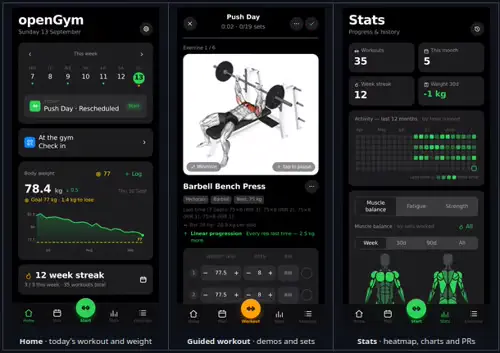
openGym provides a weekly workout planner with routines organized by day. Users can create and modify training sessions, move workouts between days, and choose from predefined workout plans such as Push/Pull/Legs, Upper/Lower, Full Body, and 5×5.
The exercise library contains more than 1,300 exercises with animated demonstrations. Exercises can be searched, browsed by muscle group, and filtered according to available equipment.
During workouts, the application supports regular sets, supersets, warm-ups, cardio, rest timers, and exercise tracking. It records training history and provides statistics including personal records and progress charts.
Muscle analysis is another notable feature. openGym can show which muscles are being trained, fatigued, or detrained, helping users understand how their training volume is distributed over time.
The application can import workout history from services and applications including FitNotes, Strong, and Hevy. This makes switching to a self-hosted system considerably easier for existing users.
Authentication uses passkeys, while the application can operate offline and synchronize data when connectivity returns. The synchronization system uses revisions to prevent one device from silently overwriting changes made by another device.
Download openGym APK v1.3.10 - Software Mirrors |
|---|
openGym APK v1.3.10 for Android |
openGym APK v1.3.10 Source Code |
openGym APK v1.3.10 Release Notes:A new look, a rotation for people who don't train on fixed weekdays, swipe actions, your own accent colour, and a sync that holds on to every rep. Grab the APK below or pull the new images, and then update the app on every device you sync. 🏋️ This one grew. The plan was a queue and a rotation; along the way the whole app got a calmer look, swipe actions arrived, you can pick any accent colour you like, and sync was taken apart and put back together so that no device can quietly lose your training again. Thirty-five community pull requests from twelve contributors, fifteen issues closed, and a long night of testing behind it. Web bundle, APK and API image. Please update the app on every device that syncs (phone, browser tabs, the Android app). An older phone keeps working, but only a fully updated set of devices gets all of the new safety nets. Before you update, open each device once with internet so everything it owes the server has arrived. A new design
db.json is kept as db.json.bak, and the server starts from that copy if the main file
is damaged. We killed it eighty times mid-write; every confirmed save was on disk.
Reminders and alerts
BASE_PATH (#346), rating a superset set
scrolls to the partner (#347), "rest over" on one device (#348), imported sessions graded on all
sets (#349), hardened importers (#350), Coach messages in your language (#351), Coach consent
that names notes (#352), the muscle chip keeps the equipment filter (#353), the plate load kind
is kept (#354), MCP tools that answer the question asked (#355) and explain a broken data folder
(#356), plus tests and tidying (#337, #339, #340, #342).
headers middleware, a second
Access-Control-Allow-Origin, SSO in front of /api/), with a one-line curl check. openGym
handles CORS itself, so leave it alone on the openGym route.
./data/db.json.bak holds a copy of the last good db.json. Back up ./data as before.
nudge.js, nudge-copy.js, durable.js and sync-stamps.js.
1527d58866f97a380c555351cbdc0934c341eb4d8fbe034a2ed002f51278cc65, signing certificate 0d22a49e… (unchanged)
1.3.10, 1.3, latest (amd64 + arm64) on registry.gitlab.com/duartesantos8/opengym: api sha256:bb3af45b…, web sha256:15e7c311…
Full history: CHANGELOG.md |
Performance and Compatibility
openGym is designed primarily as a self-hosted web application, but it also provides an Android application and can be installed as a PWA. The Docker deployment supports both AMD64 and ARM64, making it suitable for conventional servers as well as ARM-based systems.
The deployment architecture is relatively lightweight. The API uses Node.js, while the frontend is served through nginx. User data is stored under the application's data directory, including profiles, workout state, settings, and the session signing key. This makes backups straightforward because backing up the data directory effectively backs up the application data.
Offline functionality is particularly useful for a fitness tracker because workouts can continue even when the phone temporarily loses connectivity. Changes that have not reached the server are retained, and the application indicates when it is operating offline.
There are some important self-hosting considerations. Passkey authentication requires a properly configured HTTPS origin when accessing the application from a phone. The project provides guides for Cloudflare Tunnel, Caddy, Traefik, nginx, LAN HTTPS, and Kubernetes deployments.
The exercise media also deserves attention. The application downloads the exercise images and animations from an upstream dataset rather than redistributing them directly. The repository explicitly notes that the media has separate third-party licensing considerations and should not automatically be treated as covered by openGym's AGPL license.
System Requirements
Docker with Docker Compose for the recommended self-hosted deployment
AMD64 or ARM64 system for the provided container images
Persistent storage for application data and exercise media
HTTPS and a suitable domain when using passkeys from external devices
Android device for the native Android application
Modern web browser for the web/PWA interface
Pros and Cons
Pros
Open-source and self-hosted
Your workout data stays under your control
No subscription
No advertising
No required third-party account
Passkey authentication
Offline workout support
Cross-device synchronization
Progressive Web App support
Android application
Extensive exercise library
Animated exercise demonstrations
Workout planning and guided sessions
Supersets, warm-ups, and cardio tracking
Body-weight tracking
Muscle fatigue and detraining analysis
Personal records and statistics
Imports from FitNotes, Strong, and Hevy
Docker deployment
AMD64 and ARM64 container images
Kubernetes deployment support
Cons
Self-hosting requires some technical knowledge
HTTPS configuration is necessary for convenient passkey access from phones
Users are responsible for server backups and maintenance
Exercise media has separate third-party licensing considerations
The project is relatively young compared with established commercial fitness platforms
Some advanced functionality is still actively evolving
How to Install
The simplest deployment method is Docker Compose.
Clone the repository, create the environment file, pull the prebuilt images, and start the services:
git clone https://github.com/DuarteSantos8/openGym
cd openGym
cp .env.example .env
docker compose pull
docker compose up -d
The application can then be accessed through the configured web port. The first startup downloads the exercise media required by the application.
For access from a phone, configure HTTPS and a domain before relying on passkey authentication. The project documentation provides deployment examples for common reverse proxies and tunnel solutions.
Once installed, create a profile and configure your weekly routine. Existing workout history can also be imported from supported fitness applications.
Final Verdict
openGym is an impressive self-hosted alternative to conventional workout tracking services. Its strongest feature is not simply workout logging, but the combination of data ownership, offline support, passkey authentication, cross-device synchronization, exercise analytics, and a surprisingly complete training workflow.
The Docker-based deployment is particularly attractive for technically inclined users. The application can run on relatively inexpensive hardware, while its data directory makes backup and migration straightforward.
The main drawback is that self-hosting transfers responsibility for availability, HTTPS, backups, and updates to the user. The separate licensing situation surrounding exercise media is another consideration for anyone redistributing an installation.
For users who want a modern fitness tracker without handing their workout history to a third-party service, openGym is an excellent project and one of the more compelling self-hosted fitness applications available.
Developer:
Duarte Santos
Operating System:
Android
Date Added:
2026-10-07T18:04:06.591Z
Categories:
Post a Comment/Report Broken Link: