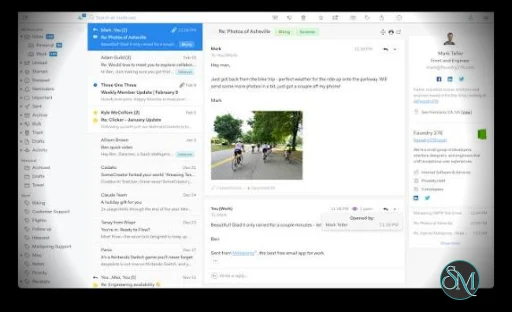
Mailspring is an open-source desktop email client for Windows, macOS, and Linux. It supports multiple email accounts, a unified inbox, snoozing, scheduled sending, mail rules, templates, calendar features, and a plugin system. Its synchronization engine is written in C++ and runs locally on the user's computer.
Features
Mailspring supports multiple email accounts through a unified inbox, making it possible to manage messages from different accounts in one interface. It also includes search, snooze, send later, mail rules, templates, and other standard email-management features.
The calendar provides event management directly inside the application. Recent releases added improved calendar interactions, including converting events between all-day and timed events by dragging them.
Mailspring supports email templates with subject lines, and threads can be dragged into the composer to attach them as EML files. Folder contents can also be exported to MBOX files.
The application includes an open plugin architecture. Developers can create plugins and themes, allowing Mailspring to be extended beyond its built-in functionality.
Mailspring also includes an optional MCP server that allows local AI agents to interact with mail. The newer releases include an attachment retrieval tool, while the Claude Desktop integration uses a built-in stdio bridge.
For users who want additional email features, Mailspring Pro adds features such as link tracking, read receipts, mailbox analytics, and contact and company profiles.
Download Mailspring 1.26.0 - Software Mirrors |
|---|
Mailspring 1.26.0 for WindowsMailspringSetup.exe | 232.11 MB |
Mailspring 1.26.0 for macOSMailspring.zip | 177.95 MB Mailspring-AppleSilicon.zip | 171.37 MB |
Mailspring 1.26.0 for Linuxmailspring-1.26.0-arm64.deb | 138.3 MB mailspring-1.26.0-amd64.deb | 138.82 MB mailspring-1.26.0-0.1.x86_64.rpm | 179.76 MB mailspring-1.26.0-0.1.aarch64.rpm | 181.49 MB |
Others Download related to Mailspring 1.26.0Mailspring-1.26.0-full.nupkg | 231.68 MB |
Mailspring 1.26.0 Source Code
Mailspring 1.26.0 Source code (zip)
Mailspring 1.26.0 Source code (tar.gz)
|
Mailspring 1.26.0 Release Notes: 1.26.0 (10/1/2026)
This is a major sync reliability release - The sync engine now tracks every folder a message lives in, rather than forcing each message into a single folder. This permanently fixes mail "flickering" between folders or disappearing from the Inbox when the same message exists in two places — a long-standing issue for iCloud users, self-addressed mail that lands in both Inbox and Sent, Exchange's duplicate Sent copies, and ProtonMail labels. (#2891) This refactor was enabled by a huge new suite of automated mailsync tests that run against real Dovecot, Cyrus in Docker and fake problematic IMAP servers.
Features:
- Folder and unread counts left wrong by previous versions are repaired automatically on upgrade. Thanks @dansleboby!
- Calendars now refresh every 15 minutes instead of every 45, so invitations accepted on another device or meetings moved by the organizer show up sooner. Contacts sync slightly less often to conserve Google API quota. Thanks @brhellman!
- After an event is saved or deleted, Mailspring re-reads the calendar from the server so the event reflects what the server actually stored. (#2915) Thanks @brhellman!
- Calendars deleted or unshared on the server are now removed from Mailspring along with their events. Thanks @brhellman!
- Mailspring now records whether each calendar is your own or shared with you, so RSVPs are never written onto someone else's calendar. (#2916) Thanks @brhellman!
- Day and week calendar views now draw events with the same chip style as the month view, and selected events fill with the calendar's own color. (#2895) Thanks @manilabui!
Security:
- Links in print preview, quick-preview and "show original" windows now open in your browser instead of loading the remote page in the window.
- Links from auxiliary windows only open in your browser after a real click or keypress, so a meta refresh in a message can no longer open a page on its own.
- "Show All" on a clipped message now sanitizes the message body and blocks remote images like the reading pane.
- Replying, forwarding and sending no longer fetch remote images referenced by the message when automatic image loading is off. Opening an event's notes no longer fetches images referenced by its description, which could tell the sender you opened the invitation. (#2901) Thanks @brhellman!
- A malicious event UID can no longer cause the sync engine to write outside the calendar collection on the CalDAV server. Thanks @brhellman!
Bug Fixes:
- Fixed duplicate Sent copies appearing on Exchange Online, Gmail, Yahoo and Zoho, which file their own copy of sent mail.
- On servers without IMAP MOVE, moving a message no longer permanently erases other messages another client had only marked for deletion (e.g. Outlook's "mark for deletion" mode).
- Fixed several provider quirks: folder roles detected by name and
\Archive support, servers reporting UIDNEXT 0, Coremail/NetEase servers that require an ID command, and servers that refuse LIST being treated as missing folders.
- Fixed mail rules not applying to self-addressed messages whose Inbox copy arrived after the Sent copy.
- Fixed the Unread view's recently-read threads leaking across views. (#2905) Thanks @dansleboby!
- Fixed Gmail messages losing text the sender placed inside the signature block when there was no quoted text. (#2902) Thanks @dansleboby!
- On Linux, fixed two title bars appearing on KDE and GNOME for users who never chose a menubar style. (#2903) Thanks @dansleboby!
- Fixed blank lines appearing in the inline reply composer. (#2896) Thanks @arnonuem!
- Fixed adding some Google Workspace and Office 365 accounts by always using the provider's servers for OAuth accounts. (#2907) Thanks @Jorl17!
- Fixed the Send button silently doing nothing when a draft's From address matches no account or alias; Mailspring now explains the problem. (#2910)
- Carriage returns are stripped from text dropped into the composer. (#2908)
- Fixed Google contacts with a birthday but no date failing to open in the contact editor. (#2912)
- Fixed an error when a sound effect can't be decoded. (#2911)
- Malformed URLs passed to Mailspring on launch are now ignored. (#2913)
- On macOS 27, notifications now respect the system "Play sound for notifications" setting and Focus modes, and the notification sound plays correctly.
- On macOS, fixed the window not being draggable beneath the window controls.
- Updated Electron to 44.5.1 to fix webview detach errors. (#2909)
- Mailspring now tells you when the server rejects an event save instead of leaving the unsaved edit on screen. (#2914) Thanks @brhellman!
- Fixed RSVPs to recurring events including other guests' attendance in the replies for moved or modified occurrences. (#2917) Thanks @brhellman!
- Fixed recurring events created in winter showing an hour off in summer: VTIMEZONEs now carry the zone's daylight saving rules, including every offset change. (#2885, #2900) Thanks @brhellman!
- Fixed Outlook and Exchange events using Windows zone names ("Central Standard Time") being shifted to your machine's time zone when edited. (#2897) Thanks @brhellman!
- Fixed an invitation that redefines the UTC zone shifting every UTC time for the rest of the session. (#2898) Thanks @brhellman!
- Fixed UTC timestamps in calendar data being read as local time. Thanks @brhellman!
- Fixed deleting a single occurrence of a recurring event deleting the entire series on the server. Thanks @brhellman!
- Fixed accepting an invitation already present on the calendar failing as a duplicate create. Thanks @brhellman!
- Fixed every calendar being marked read-only on servers that omit or aggregate privilege information. Thanks @brhellman!
- Fixed Fastmail/Cyrus scheduling Inbox and Outbox collections appearing as calendars, and DAV principal discovery on some servers. Thanks @brhellman!
- Fixed RSVP emails violating MIME line-length and encoding rules, which some mail servers refuse. Mailspring also accepts iTIP COUNTER proposals when responding. Thanks @brhellman!
- Fixed a failing manual calendar refresh aborting the sync process. Thanks @brhellman!
- Fixed CalDAV and CardDAV discovery on servers that use 303, 307 or 308 redirects from
/.well-known. Thanks @Alintya!
- Fixed a blur on a calendar time field moving the event to today, a timed event losing its time when its day is changed, and a bare hour like "3" always being read as PM. (#2890, #2892, #2893) Thanks @manilabui!
- Fixed all-day event saves writing the wrong date span. (#2894) Thanks @manilabui!
- Fixed event notes missing when the description begins with
itemprop=description meta tags.
Improvements:
- The offline indicator is a less aggressive gray, and coming back online re-syncs your accounts immediately, clearing the indicator.
Developer:
- Added an extensive fakeimap, Cyrus and Dovecot test suite for the sync engine.
- Updated out of date GitHub Actions versions.
- Fixed Playwright assertions for the macOS 27 navigation bar.
|
Performance and Compatibility
Mailspring uses a C++ synchronization engine based on Mailcore2 rather than the JavaScript synchronization system used by its Nylas Mail predecessor. The project states that this design uses roughly half the RAM and CPU of Nylas Mail and is designed to minimize CPU wakeups.
The desktop interface is built with Electron, React, and TypeScript, while the synchronization engine runs locally on the computer. This gives Mailspring a modern cross-platform interface while keeping the core mail synchronization engine native.
Mailspring continues to receive updates. Version 1.24.1 was released on September 14, 2026, adding folder-level Mark All as Read functionality, unread-count options, improved unified-inbox draft behavior, and a new plugin extension point.
The latest release also improved Windows compatibility by adding recovery from GPU-related renderer crashes during startup. On macOS, Mailspring now requires macOS 13 Ventura or later because newer Chromium versions dropped support for macOS 12. Windows and Linux requirements remain unchanged.
System Requirements
Mailspring is available for Windows, macOS, and Linux. The latest release requires macOS 13 Ventura or newer. Windows and Linux system requirements are unchanged in the latest release.
Supported platforms:
Windows
macOS 13 Ventura or newer
Linux
Internet connection for synchronizing email accounts
Additional storage for local mail data and application files
The project does not specify a fixed minimum CPU or RAM requirement in its main documentation.
Pros and Cons
Pros
Open source
Available for Windows, macOS, and Linux
Unified inbox
Multiple email accounts
Snooze
Scheduled sending
Mail rules
Email templates
Calendar
EML and MBOX export options
Plugin and theme support
C++ synchronization engine
Local mail synchronization
MCP support for AI integrations
Active development and regular releases
Optional Pro features
Cons
Uses Electron for the desktop interface
Some advanced features require Mailspring Pro
macOS 13 or newer is required by the current release
Local mail data requires additional disk space
AI and MCP functionality requires additional configuration
Plugin compatibility can vary between extensions
How to Install
Download the appropriate Mailspring package for Windows, macOS, or Linux from the official Mailspring download page. The project provides compiled packages for all three platforms.
Install the application using the normal installation process for your operating system. After launching Mailspring, add your email accounts and complete the provider authentication process.
Once an account is configured, Mailspring synchronizes its messages locally and provides access through the unified inbox and account-specific folders.
Users who need additional functionality can configure plugins, themes, templates, calendar features, or the optional MCP integrations.
Final Verdict
Mailspring is a capable open-source desktop email client that combines a modern interface with a native C++ synchronization engine. Its unified inbox, mail rules, scheduled sending, templates, calendar, export tools, and plugin architecture make it suitable for users managing multiple email accounts.
The application remains actively developed, with recent releases adding features such as Office 365 shared mailbox support, MBOX export, calendar improvements, MCP integrations, and Windows crash recovery.
The main limitation is that some advanced features are reserved for Mailspring Pro, while the Electron-based interface can use more resources than a fully native desktop client. For users looking for an open-source, cross-platform email application with a broad feature set, Mailspring is a practical choice.
Post a Comment/Report Broken Link: