IINA is a modern open source media player built specifically for macOS. Powered by the mpv playback engine and written in Swift, it combines broad media format support with a polished interface that feels much more at home on a Mac than many cross-platform players.
For Mac users looking for an alternative to QuickTime Player or VLC, IINA is one of the easiest recommendations. It supports local video and audio, online streams, subtitles, playlists, Picture in Picture, playback customization, and an increasingly capable plugin system.
IINA was designed around a simple goal: provide the powerful playback capabilities of mpv while presenting them through a proper native macOS interface.
That combination works particularly well. mpv handles the difficult media playback work, while IINA adds a more approachable graphical interface, macOS-specific features, configurable controls, subtitle tools, playlists, and other conveniences.
Key Features of IINA
Excellent Media Format Support
Because IINA is based on mpv, it can handle a very wide range of video and audio formats.
It is suitable for common formats such as MP4, MKV, MOV, WebM, and many others, while also providing the decoding capabilities expected from a modern media player.
This makes it particularly useful for users with large local media collections who do not want to worry about whether a particular file will play.
Native macOS Interface
The interface is one of IINA's biggest advantages.
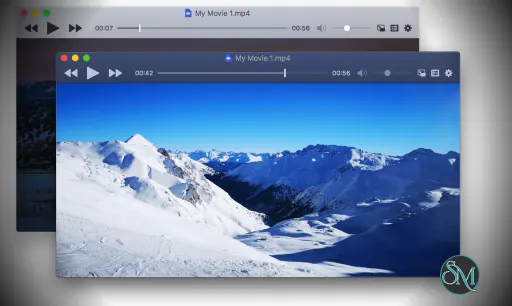
Rather than simply placing a generic media player interface on top of macOS, IINA was designed specifically around Apple's desktop environment. It supports features such as Dark Mode, Picture in Picture, system media controls, trackpad gestures, and other Mac-specific interactions.
The result is a player that feels considerably more natural on macOS than many cross-platform alternatives.
Picture in Picture
IINA supports macOS Picture in Picture, allowing videos to remain visible in a floating window while working in other applications.
This is particularly useful for tutorials, lectures, streams, and other content that users want to watch while multitasking.
Subtitle Support
Subtitle handling is another strong area.
IINA can intelligently match local subtitle files and search for subtitles online. The player also provides extensive subtitle controls, making it suitable for movies, TV shows, language learning, and downloaded video collections.
The plugin system also allows custom subtitle functionality to be added.
Playback Customization
Users can adjust playback speed, video and audio filters, aspect ratio, and other playback settings.
Keyboard, mouse, trackpad, and gesture controls can also be customized extensively. Advanced users can access mpv configuration files and scripts for even more control.
Online Media
IINA can handle online streams in addition to local files. Its browser extensions make it possible to send supported online media directly to the player.
The newer plugin architecture expands this functionality further. The official Online Media plugin provides features such as yt-dlp updates, quality selection, and video downloading.
Music Mode
IINA is not restricted to video.
Its standalone Music Mode provides a dedicated interface for listening to audio files, making it useful as a basic local music player as well.
Plugin System
The plugin system is one of the most important recent improvements to IINA.
Since version 1.4.0, IINA can be extended with JavaScript plugins. Plugins can interact with playback, mpv APIs, playlists, subtitles, menus, overlays, sidebars, preferences, files, and network requests.
This gives developers considerable freedom to customize the player.
There are already plugins for online media, OpenSubtitles, user scripts, Anime4K, Jellyfin, bookmarks, danmaku, frame navigation, Trakt, ListenBrainz, and other functions.
Thumbnails and Playback History
IINA provides video thumbnails for easier navigation and supports unlimited playback history.
These small conveniences become particularly useful when managing a large collection of movies, TV episodes, tutorials, or other long-form videos.
Download IINA v1.5.0 - Software Mirrors |
|---|
IINA v1.5.0 for macOS |
IINA v1.5.0 Source Code |
IINA v1.5.0 Release Notes:IINA 1.5.0 introduces the biggest interface redesign since its launch. In-app auto update will be published within 24 hours.Redesigned WebsiteCheck out our new website at iina.io and read our blog post about the 1.5.0 release!New
Bug Fixes
Improvements
Updates
Plugin API
Deprecation NoticeIINA 1.5.0 now requires macOS 11 Big Sur or later for Intel Macs and macOS 12 Monterey or later for Apple Silicon Macs. Due to limitations of Xcode, we expect to deprecate macOS 11 in the following IINA release. |
Performance and User Experience
IINA's biggest strength is the combination of mpv's playback capabilities with a genuinely Mac-oriented interface.
Users who have tried mpv directly may appreciate the additional convenience, while VLC users may find IINA considerably more consistent with modern macOS design.
The player also provides enough customization for advanced users without forcing those options into the main interface. Someone who simply wants to open an MKV file can do that immediately, while an experienced mpv user can configure scripts, filters, key bindings, and other advanced settings.
The plugin system makes IINA even more interesting because users are no longer limited to functionality implemented directly in the main application.
There are some platform requirements to keep in mind. Current versions require relatively modern versions of macOS, with Apple Silicon and Intel Macs having different minimum supported versions.
Pros
Free and open source.
Designed specifically for macOS.
Based on the powerful mpv playback engine.
Excellent format compatibility.
Native macOS interface.
Picture in Picture support.
Excellent subtitle features.
Online media support.
Music Mode.
Customizable keyboard and gesture controls.
Video thumbnails.
Extensive playback customization.
Powerful mpv configuration and scripting.
JavaScript plugin system.
Active development.
Large and growing plugin ecosystem.
Cons
macOS only.
Requires a relatively modern version of macOS.
Advanced mpv configuration can be intimidating for beginners.
Some online media features depend on external tools such as yt-dlp.
The large number of customization options may take time to learn.
Who Should Use IINA?
IINA is an excellent choice for Mac users who regularly watch downloaded movies, TV shows, tutorials, lectures, anime, or other media files.
It is also a particularly good option for power users who want more control than QuickTime provides without sacrificing a polished native interface.
Developers and enthusiasts will appreciate the mpv configuration and plugin system, while ordinary users can simply install IINA and start watching videos without needing to understand how mpv works underneath.
Final Verdict
IINA remains one of the strongest open source media players available for macOS. Its combination of mpv's powerful playback engine, native Mac interface, extensive subtitle support, Picture in Picture, online media capabilities, customization, and plugin architecture gives it a remarkably complete feature set.
The recent plugin system is particularly important because it turns IINA from a highly capable media player into an extensible media platform. Developers can add functionality without waiting for the core project to implement every possible feature.
For Mac users who want a free, open source, flexible, and powerful media player, IINA is difficult to beat.
Post a Comment/Report Broken Link: