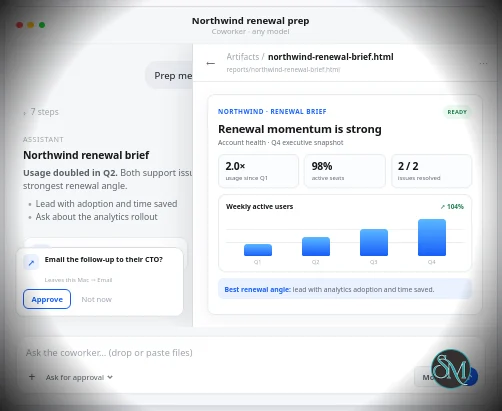
OpenCoworker is an open-source AI agent application that allows users to assign real-world tasks to AI models that can operate on files, documents, coding projects, and connected tools.
Unlike traditional AI chat interfaces, OpenCoworker can:
Work inside local folders
Create and modify files
Schedule recurring tasks
Connect to external tools
Use MCP servers
Operate with multiple AI providers
Maintain long-running workflows
The platform is designed to function more like a digital coworker than a conversational assistant.
The result is a platform that attempts to bridge the gap between AI chatbots and autonomous agents by allowing AI models to work directly with files, folders, automations, and external tools on a user's machine.
Relationship to aisuite
A common misconception is that OpenCoworker and aisuite are the same product.
In reality, aisuite is a lightweight open-source library created to provide a unified API across multiple AI providers, allowing developers to switch between models using a consistent interface. It supports providers such as OpenAI, Anthropic, Google, Ollama, AWS, Mistral, and others.
OpenCoworker builds on similar multi-model concepts but focuses on practical task execution rather than API abstraction.
For developers, aisuite serves as infrastructure.
For end users, OpenCoworker serves as the application layer.
Download aisuite OpenWorker v0.3.0 - Software Mirrors |
|---|
aisuite OpenWorker v0.3.0 for WindowsOpenWorker_0.3.0_x64_en-US.msi | 73.51 MB OpenWorker_0.3.0_x64-setup.exe | 61.75 MB |
aisuite OpenWorker v0.3.0 for macOSOpenWorker_0.3.0_x86_64.dmg | 79.16 MB OpenWorker_0.3.0_aarch64.dmg | 77.47 MB OpenWorker-macos-x64.dmg | 79.16 MB OpenWorker-macos-x64.app.tar.gz | 79.98 MB |
Others Download related to aisuite OpenWorker v0.3.0openworker-linux-x86_64.tar.gz | 91.95 MB openworker-linux-aarch64.tar.gz | 90.19 MB |
aisuite OpenWorker v0.3.0 Source Code |
aisuite OpenWorker v0.3.0 Release Notes:OpenWorker 0.3.0Agent Security OpenWorker now provides multiple layers of protection for AI agents. The approval system and the permission ladder decide what an agent _may_ do, and a secure runtime now sets a hard limit on what it _can_ do. OpenWorker integrates the OpenShell secure runtime from the NVIDIA Open Agent Safety Platform, announced this week. It is an enforceable boundary outside the model and the agent harness. Every agent runs in its own Linux container, with Landlock and seccomp on every process. This enables Users to restrict AI agents to only allowed files and allowed websites. Even if an agent is misled by a prompt injection or drifts from its task, it cannot read your other files, take your keys, or reach anywhere else. Docker (or Docker Desktop) needs to be installed on Mac, Windows or Linux to allow OpenWorker to setup and use OpenShell. In absence of Docker, sandboxing is still provided using OS specific primitives. Detailed architecture to come soon as a blog and docs. Thanks to @devikaverma for this researching and enabling above techniques inside OpenWorker to provide a more secure way to run AI agents. Set it up in Settings ▸ Sandbox. Machines. Run OpenWorker on a different machine and use it from the desktop app. Sessions live on that remote machine and keep running when your laptop is closed. Join a machine from Settings ▸ Machines. This enables several use cases like 24x7 code reviewer agent, or an agent that answers question from Slack.openworker command line. On Linux, install it with one command:
openworker-linux-x86_64.tar.gz or openworker-linux-aarch64.tar.gz.
The command line can be used to make a remote openworker join the Desktop app, allowing the user to control it remotely.
Also: the app is in English and Simplified Chinese; many fixes to the agent loop, approvals, scheduled tasks and MCP tools.
More languages are in the roadmap.
Downloads: Mac (Apple Silicon: OpenWorker-macos-arm64.dmg; Intel: OpenWorker-macos-x64.dmg), Windows (OpenWorker-windows-setup.exe), Linux (above).
What's Changed
New Contributors
|
Key Features of OpenCoworker
Bring Your Own Model
One of OpenCoworker's strongest features is model flexibility.
Users can connect:
OpenAI models
Anthropic Claude models
Google Gemini models
Local Ollama models
Switching between models can be done per conversation or task.
Real File Access
Unlike chatbot interfaces that generate text outputs, OpenCoworker can work directly with user files.
The agent can:
Create documents
Edit existing files
Generate reports
Build project structures
Produce assets stored on disk
Everything remains accessible as standard files on the user's system.
Automations
The application supports scheduled workflows.
Examples include:
Daily summaries
Market reports
Research updates
File processing jobs
Recurring content generation
These tasks can execute automatically without requiring continuous user supervision.
MCP Support
OpenCoworker supports the Model Context Protocol (MCP), allowing integration with external tools and services through standardized interfaces.
This significantly expands the capabilities of the platform beyond simple file manipulation.
Security Controls
The application includes approval-based workflows for potentially risky operations.
Users remain in control of sensitive actions rather than granting unrestricted autonomy to AI agents.
User Experience
The experience feels noticeably different from ChatGPT, Claude, or Gemini.
Instead of repeatedly prompting a chatbot, users assign objectives and review outputs.
For example, a user might ask OpenCoworker to:
Research a topic
Generate a report
Create project files
Update documentation
Organize data
The agent then performs the work and produces actual files rather than simply displaying responses in a chat window.
The interface is relatively approachable compared to many agent frameworks, though it still requires a basic understanding of AI models, permissions, and workflows.
Performance
Performance depends primarily on:
Selected AI model
Hardware resources
Task complexity
External tool integrations
Simple document-generation tasks are typically fast.
More complex workflows involving coding, MCP tools, or large projects can take significantly longer, depending on the chosen model and environment.
Open Source Advantages
Being open source offers several benefits:
Transparency
Community contributions
Self-hosting options
No vendor lock-in
Greater privacy control
Users can inspect the codebase and customize deployments according to their needs.
Community Feedback
Developer discussions generally highlight two major strengths:
Simplicity
Model flexibility
Many users appreciate the philosophy inherited from aisuite, where switching AI providers requires minimal effort. Others view unified AI abstraction layers as useful for experimentation but question how often model switching is required in production.
Community feedback regarding aisuite itself frequently praises its beginner-friendly design and low learning curve, though some developers note that larger frameworks may provide more extensive documentation and ecosystem support.
Limitations
Despite its promise, OpenCoworker remains an early-stage project.
Current limitations include:
Smaller community than established AI platforms
Reliance on external model APIs
Requires API keys or local models
Limited ecosystem compared to mature agent frameworks
Some workflows still require manual supervision
The platform is better viewed as a productivity assistant than a fully autonomous employee.
Pros
Open source
Supports multiple AI providers
Real file creation and editing
MCP integration
Automation capabilities
User-controlled permissions
Flexible deployment options
Beginner-friendly compared to many agent frameworks
Cons
Early-stage project
Smaller ecosystem
Requires external AI providers or local models
Advanced workflows may need technical knowledge
Limited long-term production track record
Who Should Use OpenCoworker?
OpenCoworker is ideal for:
Developers
Technical writers
Researchers
AI enthusiasts
Content creators
Small teams
Users experimenting with AI agents
It is particularly useful for people who want AI to generate actual work products rather than simply provide conversational responses.
OpenCoworker offers an interesting vision of what desktop AI agents can become. By combining real file access, automation, multi-model support, and open-source flexibility, it delivers capabilities that go beyond traditional AI chat applications. While the platform is still young and its ecosystem is evolving, it already provides a compelling environment for users looking to experiment with practical AI coworkers rather than simple conversational assistants.
Post a Comment/Report Broken Link: